
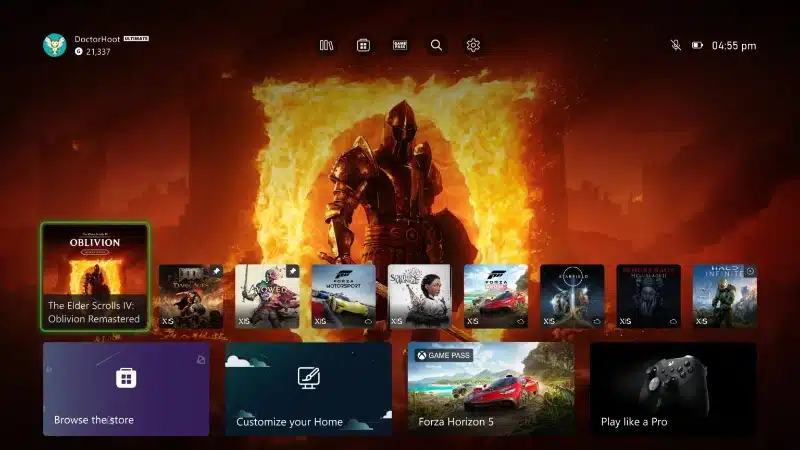
Key Highlights:
- New Xbox Home UI lets players hide system apps, pin favourites, and reduce tile clutter.
- Update available now for Alpha and Alpha Skip-Ahead Insiders; full rollout expected in the coming weeks.
- Focus on player control, clarity, and customisation.
Quick Links:
Xbox is making meaningful improvements to the console’s dashboard, with a set of upcoming changes that give players greater control over how their Home screen looks and behaves.
Detailed in the latest blog post on Xbox Wire, these new UI options are part of a broader strategy to refine daily usability while aligning the dashboard with real user preferences.
What’s Changing on the Xbox Dashboard?
The Xbox Home interface acts as the command centre for the console. Every interaction, from launching games to browsing apps funnels through this space.
So when Xbox adjusts the UI, it directly affects how smooth or cluttered the overall experience feels.
This new round of enhancements includes three specific features aimed at giving players more say over their layout:
- Hide System Apps: For those who prefer a game-first dashboard, this feature allows players to remove non-essential tiles like Settings or the Microsoft Store from the recently played list. The result is a cleaner, more focused view that prioritises gaming and entertainment.
- Pin Favourites to Home: Players can now pin up to three games or apps they use frequently. These pinned items stay locked at the top of the list even as new titles are opened, ensuring that high-priority content is always front and centre.
- Reduce Tile Count (Coming Soon): Currently in development, this option will allow users to limit the number of visible tiles on their Home screen, offering a stripped-back, distraction-free view. It’s designed for players who value minimalism and clarity.
Each of these options addresses long-standing community feedback.
Gamers want to feel like their console is tailored to them, not just a one-size-fits-all interface. By letting users curate what’s visible, Xbox makes it easier to navigate quickly, focus on what matters, and cut out the noise.
These changes aren’t just cosmetic. Reducing UI clutter can improve load speeds and responsiveness.
Pinning favourites can streamline routines, whether you’re jumping back into a multiplayer session or watching a favourite streaming app.
Who Gets It First?
As with most Xbox feature updates, the rollout starts with Alpha Skip-Ahead and Alpha Insiders, the platform’s earliest testers.
This allows Xbox to gather detailed usage data and fix any issues before launching the update for the broader public.
While there’s no confirmed launch date for the general audience, the update is expected to arrive in the coming weeks.

Xbox has a strong track record of iterating on feedback, so final changes may reflect what early testers report back.
These tweaks continue a trend seen in Xbox’s recent UI overhauls: greater user control, smarter layouts, and quicker access to content.
In a generation where both PlayStation and Xbox are doubling down on UX as a differentiator, Xbox’s focus on dashboard refinement reflects an understanding that the journey between games matters just as much as the games themselves.
For Xbox players seeking a more intuitive and personalised experience, this update looks set to deliver exactly that.