

I have lived with the Xbox Series X for a good chunk of this generation now, and it has quietly become the most low-stress way I play games. I still have a PC, I still use a PS5, and I have dabbled in handhelds, but when I just want to sit on the sofa after a long day and play something without faffing about, I reach for the Series X pad more often than I expected.
Five years in, it is still a powerful, relevant console, but it also sits in a slightly strange place. Microsoft is clearly leaning hard into cloud gaming and Game Pass as a service, and the exclusive line-up is nowhere near as strong or defined as previous Xbox generations. Even with that, the Series X as a piece of hardware is excellent value and still one of the best all-in-one boxes you can put under your TV.
These are the specifications for the original 1 TB Carbon Black model with the disc drive:
| Specification | Xbox Series X |
|---|---|
| Release date | 10 November 2020 |
| Processor | Custom 8-core AMD Zen 2 CPU at 3.8 GHz, or 3.6 GHz with SMT |
| Graphics | Custom AMD RDNA 2 GPU with 52 compute units at 1.825 GHz |
| GPU performance | 12 teraflops |
| Memory | 16 GB GDDR6 |
| Internal storage | 1 TB custom NVMe SSD |
| Storage expansion | Xbox Series X|S Storage Expansion Card and external USB 3.1 storage |
| Gaming resolution | Native 4K target |
| Maximum frame rate | Up to 120 FPS |
| Display features | HDMI 2.1, Variable Refresh Rate, Auto Low-Latency Mode, AMD FreeSync and HDR |
| Optical drive | 4K UHD Blu-ray drive |
| Audio support | Dolby Digital 5.1, DTS 5.1, Dolby TrueHD with Atmos and up to 7.1 L-PCM |
| Connectivity | Gigabit Ethernet, dual-band 802.11ac Wi-Fi and Xbox Wireless |
| Ports | One HDMI 2.1 output, three USB 3.1 Gen 1 ports and one storage expansion slot |
| Dimensions | 15.1 × 15.1 × 30.1 cm |
| Weight | 4.45 kg |
Quick Links:
Design, Build and Everyday Use
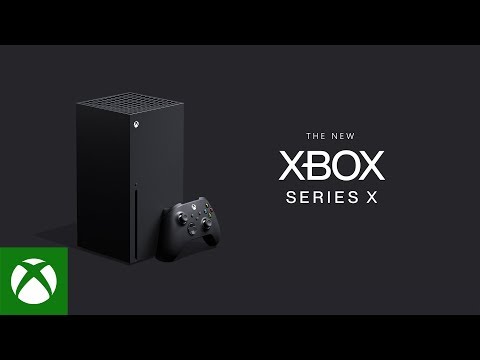
The Series X is not subtle in spec, but it is surprisingly subtle in design. It looks like a black monolith, more like a small piece of minimalist furniture than a “gamer” box. I prefer that, it disappears next to the TV instead of shouting for attention.
On the front you get the disc drive and eject button, a single USB port and the Xbox power button. Round the back you have HDMI out, Ethernet, two more USB ports, the proprietary storage expansion slot and power in. It is simple, tidy and easy to plug into pretty much any setup. Compared with the launch PS5, it is easier to fit into a normal TV unit, even if it is still chunky and tall.
It has now been out for just over five years, and on the outside almost nothing has changed beyond limited edition skins and bundles. Inside it has had a steady stream of firmware updates, quality of life tweaks and feature additions, but the core proposition is the same console that launched.
Noise and heat have been impressively controlled. Under load, the top vent runs warm, but the fan curve is gentle and the unit is quiet enough that game audio easily drowns it out. It is far calmer than the old Xbox One days when the fan and drive could be quite loud. In day to day use, you switch it on, it drops you straight back into the dashboard and the whole thing just feels dependable.
Power, Performance and Visuals
I am not interested in pixel counting for its own sake, but I do care about how games feel to play and how they look from a normal sofa distance. Coming from years of PC gaming, I wanted three things: good resolution, high enough frame rates and a broad game selection. The Series X hits all three more often than not.
On paper you get up to 4K and 120 Hz, support for variable refresh rate and the usual set of HDR features. In practice most titles offer at least two modes: a performance option that targets 60 frames per second, sometimes higher, often with reconstructed or dynamic resolution, and a fidelity option that aims for a sharper 4K output at 30 frames per second.
I always favour the performance modes, especially for shooters and action games. Even when the internal resolution is not truly native 4K, it still looks excellent on a 4K display, and motion feels far smoother. To be blunt, 4K is 4K from the sofa. Whether it was native, upscaled or reconstructed, most people will not care as long as it is clean and the frame rate is stable.
If you want the sharpest image and you are happy with 30 frames per second, the fidelity modes are there. In games that really lean into lighting and detail, like big single player adventures, that can be a nice way to replay something, but for a first run I still think the smoother performance modes are the better choice.
Under the hood the GPU performance sits roughly in the same bracket as an RTX 2070 class PC, which is still very respectable in 2025, especially for the price. You are getting a pre-tuned, fixed platform that developers can target directly without worrying about hundreds of hardware combinations.
Quick Resume and SSD: The Secret Sauce
The internal SSD and Xbox’s Quick Resume feature are the two things I appreciate most on the Series X. The raw drive speed means loading times are fast in general, but it is Quick Resume that really changes how you use the console.
Being able to suspend several games, power the console off, come back the next evening and drop straight back into the exact spot you left off is genuinely brilliant. No boot screens, no main menus, no matchmaking waiting room if you were in a solo or co-op session, you just continue. When you only have twenty to sixty minutes to play after a long day, not wasting ten of those on loading is a big deal.
The feature is not perfect. Some online titles or games with aggressive server connections do not always support it cleanly, and certain patches will clear the Quick Resume state, but when it works it feels futuristic. It is one of the few generational features that I now miss when I switch to a different platform.
Game Pass, Library and Backwards Compatibility
Game Pass is the single biggest reason to own a Series X if you care about variety. It is basically Netflix for games. You pay a subscription and get access to a large rotating library that covers action, sports, horror, racers, RPGs and indie projects.
There are three-tiers of Xbox Game Pass: Essential, Premium, Ultimate.

As of October 2025 when the service got reinvented, Ultimate, which is the highest paid tier, now adds 75+ day one releases yearly, Fortnite Crew and Ubisoft+ Classics to the library.
The real strength is freedom, instead of paying full price for a new title and hoping it is not a dud, you can download something, try it for an hour and uninstall it if it does not click. In the old rental days you paid your money, brought the disc home and if it turned out to be rubbish, that was that. Here you just move on and launch the next thing. It does kind of remind me of Blockbuster, if Blockbuster did subscription services.
Cloud streaming adds another layer. If you do not want to wait for a download or your storage is full, you can spin certain titles up from the cloud and test them instantly. Input latency and image quality are not always perfect, but as a way to sample a game before committing to a full install, it is genuinely useful.
Backwards compatibility is excellent. The Series X plays Xbox One titles, a large chunk of Xbox 360 games and even a selection of original Xbox releases. If you kept your old discs, the internal drive will read many of them, pull down any patches or compatibility packs it needs and run them with improved loading times and performance. That alone makes the Series X a great long term home for a library that might stretch back three generations.
The one area where Xbox still lags is true exclusives. There are good first party titles and some strong console launches, but compared to Nintendo and Sony, the number of experiences you can only get on Series X feels limited. On top of that, Microsoft’s newer strategy of bringing some of its previously exclusive games to other platforms means that the “must own this box for this game” feeling has faded.
That does not mean there is nothing to play. Far from it. Between first party, third party and Game Pass, there is more software than you will ever have time for. It just means that if you are buying purely on exclusives, Series X is not as convincing as a Nintendo machine or a PlayStation.
Controller: Comfortable, But Conservative
The Series X controller is a refinement of the Xbox One pad rather than a reinvention. It feels good in the hand, the shape is familiar and comfortable, and the textured grips on the triggers and back help keep it secure in longer sessions. The addition of a dedicated share button makes capturing screenshots and short clips painless, and those clips are easy to pull from the Xbox app on your phone or PC.
Haptics are fine, but basic compared to the PS5’s DualSense. You get standard rumble, not the nuanced haptic feedback and adaptive trigger resistance that Sony uses. The benefit of that simpler approach is battery life. The Xbox pad runs for a very long time on a pair of AA batteries, and if you use rechargeable cells you can keep a couple of spares charged and just swap them in seconds.
Personally, I would prefer an internal rechargeable battery like the DualSense. Having to mess around with AA cells in 2025 feels a bit old fashioned. That said, the near zero latency wireless audio support on the controller is a massive plus. Plugging a headset into the pad and getting crisp, low latency sound for competitive titles works beautifully and avoids running cables across the room.
Overall, the controller gets the job done. It is comfortable, responsive and solid, but it is conservative. If you are coming from PC or older Xbox hardware, you will feel right at home. If you have spent a lot of time with a DualSense, you may find it lacks that extra layer of physical feedback.
Accessibility and Inclusive Hardware
One thing I think Xbox still deserves real credit for is how far it has pushed accessibility compared to the rest of the industry. Over the last few years I’ve watched the line-up of adaptive hardware grow from a single device into a full ecosystem that genuinely gives disabled players more control over how they play.
The latest additions include the new Xbox Adaptive Joystick, which is a companion device designed for players with reduced mobility. It can be used one-handed, mounted on a table or paired with the existing Adaptive Controller as part of a full custom setup. On top of that, Xbox has released 3D-printable thumbstick topper files through Design Lab, so players can print shapes that match their grip strength or physical needs. It is a clever idea, and it means you do not have to wait for a specific accessory to be manufactured.
There is also the new 8BitDo Lite SE controller, built in collaboration with Xbox, which has lighter buttons, highly sensitive sticks and a non-slip base to keep it steady during play.
For players who need deeper customisation, the ByoWave Proteus Controller takes things even further. It uses modular snap-together parts that let you build a layout that suits your body, with more combinations than you will ever realistically use.
Even small touches help. The new toggle-hold feature lets you tap a button once and keep it “held” until you press it again, which makes certain actions much easier for players who struggle with sustained presses.
Xbox has also redesigned its packaging for adaptive accessories to make them easier to open, with large loops, hinged lids and no twist ties.
I do not need any of these devices myself, but I appreciate that they exist. It feels like Xbox is treating accessibility as part of the platform rather than an afterthought, and that matters for players who simply want to enjoy games on equal footing.
Storage and Media Features
The Xbox Series X ships with a 1 TB internal SSD, of which around 800–850 GB is usable once the system takes its share. When games were smaller, that felt like plenty. In the Game Pass era, when you freely download and test a lot more titles, it fills up much faster. I went from keeping one or two big games installed to juggling a much larger list without really noticing.
You can offload older or backwards compatible titles onto USB hard drives, but for full Series X games you need SSD-level speed, which is where the proprietary expansion card comes in. It slots neatly into the port on the back and behaves like part of the internal storage. The cards used to be very expensive. Prices have dropped, but they are still not cheap, so you need to weigh how much you actually need that extra room.

As a media hub, the Series X is excellent. It has a clean interface, access to the usual streaming apps like Netflix, Disney Plus, Prime Video, Apple TV, YouTube and music services such as Spotify and Apple Music. You can run those in the background while gaming if you want, and the console does a better job than most in-TV interfaces in terms of speed and responsiveness. There is even a web browser if you really want to browse from the sofa.
Gone is the HDMI passthrough that the Xbox One had, which let you feed a set-top box through the console.
I actually liked that feature and miss it a little, but realistically most people have moved to streaming, so I can see why it was dropped.
Microsoft’s Direction and What It Means
One thing you have to factor in when you buy a Series X in 2025 is the direction Microsoft is clearly heading. Cloud gaming and Game Pass are now the main story. The console is a front end for those services, not the only place to play Xbox titles.
The Activision Blizzard acquisition and the commitment to keep franchises like Call of Duty on multiple platforms reinforce that shift. The next generation of Xbox hardware may lean even more into being a hybrid device that lives alongside cloud infrastructure rather than being the central pillar.
For the Series X itself, in this moment, that is not a problem. You still get native games, you still get patches and support, and you still have a very capable machine. It just means that if you are someone who wants a box that is defined by tight exclusives and a closed ecosystem, this is not that. It is a very flexible, service-driven console, for better and worse.
Who The Series X Makes Sense For
After living with it for years, I see three main groups the Series X really suits.
Couch-first players who are tired of the desk. If you work at a computer all day and do not want to spend your evenings at the same desk, the Series X plus a decent TV is ideal. You get most of the visual quality and performance of a mid-range gaming PC in a box you can relax with on the sofa.
People who want easy access to a huge library. Game Pass changes how you think about buying games. If you like sampling lots of different genres, trying odd things on a whim and not committing £60–£70 every time you are curious, this console and that service are a perfect match.
Existing PC or PS5 owners who want a complementary box. If you already own another primary platform and you just want an additional machine to tap into Xbox’s services, backwards compatibility and certain franchises, the Series X slots in nicely without demanding you reorganise your entire setup.
If you are laser focused on exclusive single player epics and do not care about subscriptions, a PS5 or Switch will probably make more sense. If you want absolute maximum performance, a well specced PC still wins. The Series X sits in the middle as a very balanced, very likeable all-rounder.
Final Verdict: Still Worth It In 2025?
For me, yes. The Xbox Series X is still absolutely worth buying in 2025, provided you understand what it is and what it is not. It is not the king of exclusives. It is not a vastly customisable PC. It is a powerful, quiet, straightforward console that pairs perfectly with Game Pass and makes it very easy to play a lot of different games without wasting your time.
I can put the pad down after a long day, sink into the sofa, fire the console up and be back in the middle of an epic boss encounter in Elden Ring or racing through neon-lit streets in an arcade racer in under a minute. That simplicity is exactly what I want from a console.
It is not flawless. The controller feels conservative, storage expansion is still pricier than I would like, and the exclusive line-up is thinner than it should be for a platform of this size. Even with those caveats, I think it is one of the most complete and user friendly pieces of gaming hardware you can buy.
Xbox Series X
A five-year assessment of Microsoft's flagship console. Read our Xbox Series X review to see how its 4K gaming, Quick Resume feature, and Game Pass ecosystem hold up today, and who this console makes the most sense for in the current gaming landscape.
Product Brand: Xbox
8.5
Pros
- Powerful hardware that comfortably handles 4K gaming with solid performance modes
- Quick Resume and fast SSD dramatically cut down on wasted time in menus and loading screens
- Excellent backwards compatibility with Xbox One, 360 and original Xbox games
- Game Pass offers huge value and freedom to try a wide variety of titles
- Clean, minimalist design that fits neatly into a living room setup
- Strong media centre features with all major streaming and music apps
- Controller is comfortable, with great wireless headset support and long battery life
Cons
- First party exclusive line-up is weaker and less defined than PlayStation and Nintendo
- Controller feels conservative compared to feature rich pads like the DualSense
- Internal usable storage fills quickly, and proprietary expansion cards are still not cheap
- Bulkier design may not suit smaller or more minimal TV setups
- Increasing focus on cloud and multi-platform releases can make the console feel less “special” as a destination for unique games