
Key Highlights:
- There are five 3D Printers in Sons of the Forest, with the Entertainment Bunker printer being the easiest to reach early because its printer room requires no progression item.
- 3D Printers now start empty, so you must supply Printer Resin before producing any of their seven available items.
- Printer Resin has a 1,000ml inventory limit. A Printed Sled costs the full 1,000ml, while printing one of every available blueprint costs 1,725ml.
Quick Links:
The 3D Printer in Sons of the Forest is a stationary crafting machine that converts Printer Resin into equipment, ammunition and components that cannot be made through normal inventory crafting.
Every 3D Printer provides the same seven blueprints, so you only need access to one machine to use the complete printing system.
Where to Find a 3D Printer
The easiest 3D Printer to reach early is inside the Entertainment Bunker on the western side of the island.
Enter the cave leading towards the bunker and continue through the collapsed section into the utility corridor. At the junction, look for the maintenance room marked by yellow construction signs.
The 3D Printer is inside this room alongside a sleeping bag and other supplies.
Crucially, you do not need the Maintenance Keycard to reach the printer. The locked keycard doors are farther into Entertainment Bunker, after the printer room.
The Entertainment Bunker location is not automatically displayed on the GPS at the beginning of a new game. Its position can be revealed by the POI laptop near the entrance of Rebreather Cave, although you can still travel directly to the bunker if you already know where the entrance is.
All 3D Printer Locations
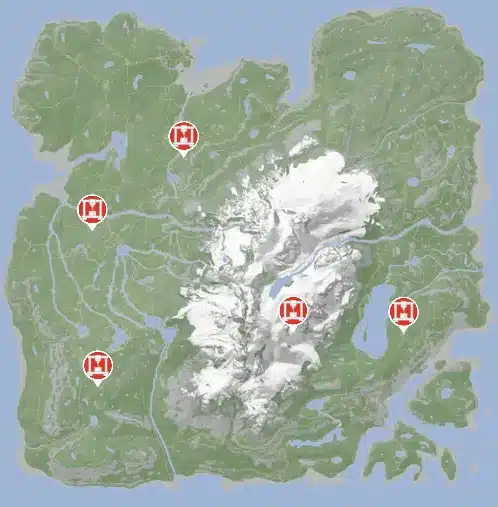
There are five working 3D Printers across the island.
| Location | Access Requirement | Location Detail |
|---|---|---|
| Entertainment Bunker | None for the printer room | Western side of the island, inside the maintenance room before the secured bunker section |
| Maintenance A | Shovel | Buried bunker beside a river bend on the western side |
| Maintenance B | Shovel | Buried beneath a cannibal settlement near the crashed light-aircraft area |
| Residential Bunker | Guest Keycard | Inside one of the apartments in the large eastern bunker |
| Ice Camp | No progression item | Outdoors at the large camp in the south-western mountains |
Four of the five locations are therefore tied to the island’s wider bunker network, while the Ice Camp printer is the exception because it sits above ground alongside Printer Resin and other supplies.
Maintenance A and Maintenance B are not useful as immediate printer destinations because both entrances must first be uncovered with the Shovel. Residential Bunker comes later again because its secured route requires the Guest Keycard.
How Does Printer Resin Work?
Printer Resin is the only material consumed directly by the 3D Printer.
The full release changed how printers behave. They no longer begin with resin already loaded, so any older guide describing a partially filled printer is outdated.
You can carry up to 1,000ml of Printer Resin at once.
Interact with a printer to transfer carried resin into its reservoir. Once Printer Resin has been poured into a machine, you cannot take it back out. Any amount left after printing remains stored in that particular printer for later use.
That makes resin placement worth thinking about when you regularly use more than one printer. Loading 800ml into a distant bunker printer means that resin is effectively committed to that location until you spend it there.
Printer Resin can be found throughout the island, particularly around bunkers, utility areas and 3D Printer locations.
How to Use the 3D Printer
To use a 3D Printer, first load enough Printer Resin for the item you want to produce.
The connected laptop controls the available blueprints. Cycle through the printing options until the required item appears, then start the print.
The display shows:
- the selected blueprint
- its Printer Resin cost
- the amount of resin currently available
- printing progress
Once printing finishes, collect the completed item from the printer bed.
All five printers use the same blueprint selection. Finding additional machines gives you more convenient printing locations, not additional recipes.
What Can You Print with the 3D Printer?
The 3D Printer currently produces seven different items.
| Printed Item | Resin Cost | Quantity | Main Use |
|---|---|---|---|
| 3D Printed Arrow | 50ml | 5 | Reusable ammunition for the Crafted Bow and Compound Bow |
| 3D Printed GPS Case | 75ml | 1 | Component used to craft a GPS Locator |
| Printed Flask | 100ml | 1 | Carries water and prepared stews |
| Printed Grappling Hook | 100ml | 2 | Combines with Rope to make Zipline Rope |
| Red Mask | 150ml | 1 | Can disguise the player from some cannibals under suitable conditions |
| Tech Mesh | 250ml | 1 | Required component for Tech Armor |
| Printed Sled | 1,000ml | 1 | Reusable downhill and river traversal tool |
The 3D Printed GPS Case is why some older printer guides only list six options. GPS Locators became craftable later in development, with the printed case added as one of their required components.
Printed Grappling Hooks also need an extra crafting step. Each printing cycle creates two hooks, but a hook is not loaded directly into the Rope Gun. Combine each Printed Grappling Hook with one Rope to create a Zipline Rope.
Tech Mesh has a much larger resin cost once you look beyond a single piece. A complete set of Tech Armor uses 10 Tech Mesh, meaning the mesh alone requires 2,500ml of Printer Resin before the other armour components are considered.
The Printed Sled is the most expensive individual print at 1,000ml. Because 1,000ml is also the maximum Printer Resin you can carry, printing one Sled from an empty machine consumes an entire carried supply.
Printing one of every available blueprint costs 1,725ml of Printer Resin in total. It therefore takes more than one full inventory load if the printer begins empty, and completing all seven prints also satisfies the MAKER achievement.
What Should You Print First?
For a new save, I would normally print the Printed Flask first.
It costs only 100ml and gives you a reusable way to carry drinking water and prepared stews away from a river or Cooking Pot.
After that, the best use of resin depends on what you’re actually doing.
3D Printed Arrows are inexpensive at 50ml for five and can be recovered after firing. Printed Grappling Hooks become more valuable once you start constructing permanent zipline routes, while the 3D Printed GPS Case is useful when you want additional custom GPS markers.
I would leave Tech Mesh and the Printed Sled until you have a healthier resin supply. Tech Armor quickly consumes resin across multiple pieces, while one Sled immediately uses the entire 1,000ml inventory capacity.
The Red Mask sits somewhere in between. It has a situational use against some cannibals, but I would prioritise the Flask, ammunition or progression-related crafting components before spending early resin on it.
For the wider equipment, crafting and progression network, continue through the Complete Sons of the Forest Guide.