Key Highlights:
- The main HUD tracks Health, Stamina, Armour, Fullness, Hydration, Energy and Strength, while the Stealth indicator appears when crouching.
- Fullness, Hydration, Energy and Warmth affect Vitality, which determines how much of your Stamina bar is available.
- The GPS uses separate markers for caves, discovered locations, companions, story objectives, GPS Locators and newer proximity-based points of interest.
Quick Links:
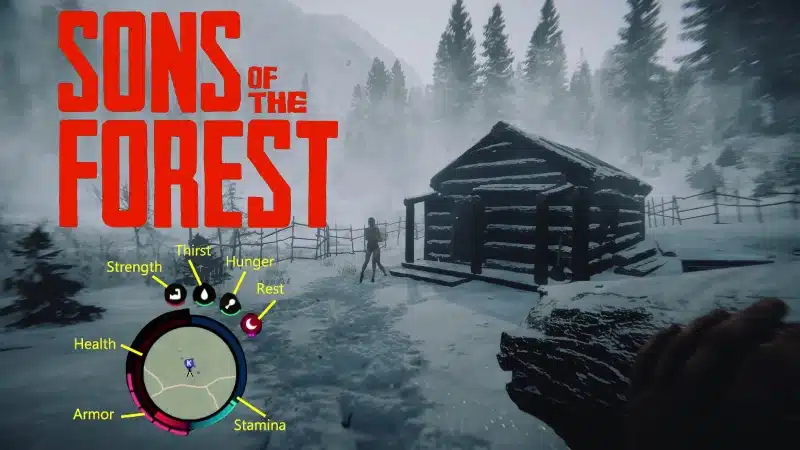
The HUD in Sons of the Forest keeps most survival information around the circular mini-map in the lower-right corner of the screen.
The red and blue bars represent Health and Stamina, while smaller icons track food, water, Energy and Strength. Other indicators appear when you equip armour, crouch for stealth or become cold and wet.
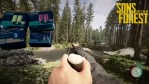
The handheld GPS Tracker uses a separate set of symbols for caves, companions, discovered locations and other points of interest.
What the HUD Stats and Icons Mean
| HUD indicator | What it means |
|---|---|
| Health | The red bar shows your current health. Strength increases your maximum health, while Meds, Health Mixes, certain foods and sleep can restore lost health. |
| Stamina | The blue bar shows how much energy is currently available for sprinting, jumping, attacking and using tools. It regenerates when you stop consuming Stamina, up to your current Vitality limit. |
| Armour | Armour appears as segments around the Health side of the HUD and absorbs damage before your Health is affected. Normal armour can be equipped in multiple pieces. |
| Fullness | The meat icon represents how well fed you are. It begins flashing when Fullness falls below 25%, and severe starvation eventually causes Health damage. |
| Hydration | The water-drop icon represents your current hydration. It also flashes below 25%, with severe dehydration eventually damaging Health. |
| Energy | The moon icon represents tiredness. Low Energy reduces Vitality and therefore the maximum amount of Stamina you can use. |
| Strength | The flexing-arm icon tracks your current Strength level and progress. Higher Strength increases maximum Health, melee damage and tree-chopping damage. |
| Stealth | The eye icon appears while crouching and indicates how visible you are while sneaking. Light levels, cover and certain armour affect Stealth. |
| Cold and Wet | Cold and wet conditions produce warnings on the HUD and reduce Vitality, limiting the usable portion of your Stamina bar until you warm up. |
The important relationship is Vitality. It is not another permanent HUD icon, but it controls your maximum usable Stamina based on Fullness, Hydration, Energy and Warmth.
Our Stamina guide covers restoring and managing that limit in detail.
The Strength indicator also represents an actual character level rather than a temporary combat meter. The full release raised the cap to Level 100 and expanded its effects, which are covered in the Strength levelling guide.
When the moon icon runs low, sleeping is the main way to restore Energy and recover your maximum Stamina capacity.
What Each GPS Map Icon Means
The GPS Tracker shows terrain, your position and a mixture of permanent, discovered and proximity-based markers.
| GPS marker | Meaning |
|---|---|
| White cave icon | Marks a cave entrance. The full release made these icons smaller to separate them more clearly from other locations. |
| Blue K | Shows Kelvin’s current location. |
| Green location marker | Marks discovered points of interest such as bunkers. Many of these do not appear until their location has been downloaded from a red-flashing laptop. |
| Red objective marker | Indicates current story objectives. Story objectives were changed to red for the full release. |
| Purple exclamation mark | Marks the original missing Team B locations where GPS Locators and other items can be recovered. |
| Blue question mark | Appears when you approach certain Jianyu Camps introduced with the full release. |
| Orange hammer | Appears near construction sites and some associated points of interest. |
| Custom GPS Locator icon | Created by placing a GPS Locator on a standing stick or giving one to Virginia. The displayed symbol can be changed before placement. |
| Vehicle marker | Golf Carts and Foldable Hang Gliders can appear on the GPS when you are close enough to them. |
Virginia does not have one fixed green walkie-talkie symbol. Giving her a GPS Locator makes her position visible using the marker icon selected on that Locator.
The GPS also does not reveal every important location from the beginning. Some bunkers and other points of interest only appear after you discover their coordinates through exploration.
For more survival systems, progression routes and item locations, see the Complete Sons of the Forest Walkthrough.